




2026-05-25 Picks
Three tools worth checking out today: one for audio editing, one for model compression, and one for visualizing prompt optimization.
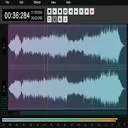
AudioMass Multitrack Audio Editor
AudioMass was already a solid browser-based single-track audio editor. Now it supports multitrack editing — drag multiple tracks into your browser, cut, mix, and export, all without installing anything.
It runs on the WebAudio API with all processing happening locally. Audio never leaves your device. Once installed as a PWA, it works offline too. Podcasters, video creators doing voiceovers, or anyone who needs to quickly trim audio can all benefit.
Currently free with no account system. Open the page and start editing.
Needle — A 26M-Parameter Tool-Calling Model
Cactus Compute did something interesting: they distilled Gemini's tool-calling ability into a model with just 26 million parameters. Called Needle, it does one thing — given a user query and a set of available tools, it outputs the correct tool call JSON.
For context, GPT-2 has 1.5B parameters. Needle is 1/60th of that. Yet on single-shot tool-calling benchmarks, it outperforms models ten times its size like FunctionGemma-270M, Qwen-0.6B, and Granite-350M.
On Cactus's inference engine, Needle achieves 6000 tok/s prefill speed. This means edge devices — phones, smartwatches, even glasses — can run an AI assistant capable of calling tools without hitting the cloud.
Model weights are fully open on HuggingFace, and there's a Gradio playground for testing, synthetic data generation, fine-tuning, and evaluation.
gepa-viz — Prompt Optimization Visualizer
The biggest problem with prompt optimization is that you can't see what's happening. You run an optimization, get a final score improvement, but have no idea which changes worked, which got rejected, or why.
gepa-viz by Modaic AI is a visualization tool specifically for observing the GEPA framework's prompt optimization process. It renders candidate prompt evolution trees as force-directed graphs — each node is a candidate, green means accepted, red means rejected.
Click a node to see the full prompt text, a diff against the parent, and a clickable Pareto frontier pixel grid. Three modes: embedded (auto-opens a browser tab during optimization), remote (stream to a standalone server), and static (dump JSON for later viewing).
Install with pip install gepa-viz. Works with both DSPy's GEPA and the standalone gepa library.
AudioMass solves the "I need to edit audio but don't want to install anything" problem. Needle explores how small a model can be while still being useful. gepa-viz fills the visualization gap in prompt optimization. Each has its place.