Introduction: The "Soul-Searching Question" of Local AI
As open-source large models like DeepSeek R1, Llama 4, and Qwen 3.5 continue to push the boundaries of capability, more and more developers and tech enthusiasts are attempting to deploy AI models locally. However, an unavoidable question always looms: Can my hardware actually run it?
Have you ever spent hours downloading a 70B parameter model, only to find insufficient VRAM and inference speeds so slow they're maddening? Or hesitated between an Apple Silicon Mac and an NVIDIA GPU, unsure of the performance difference for the same model on the two devices?
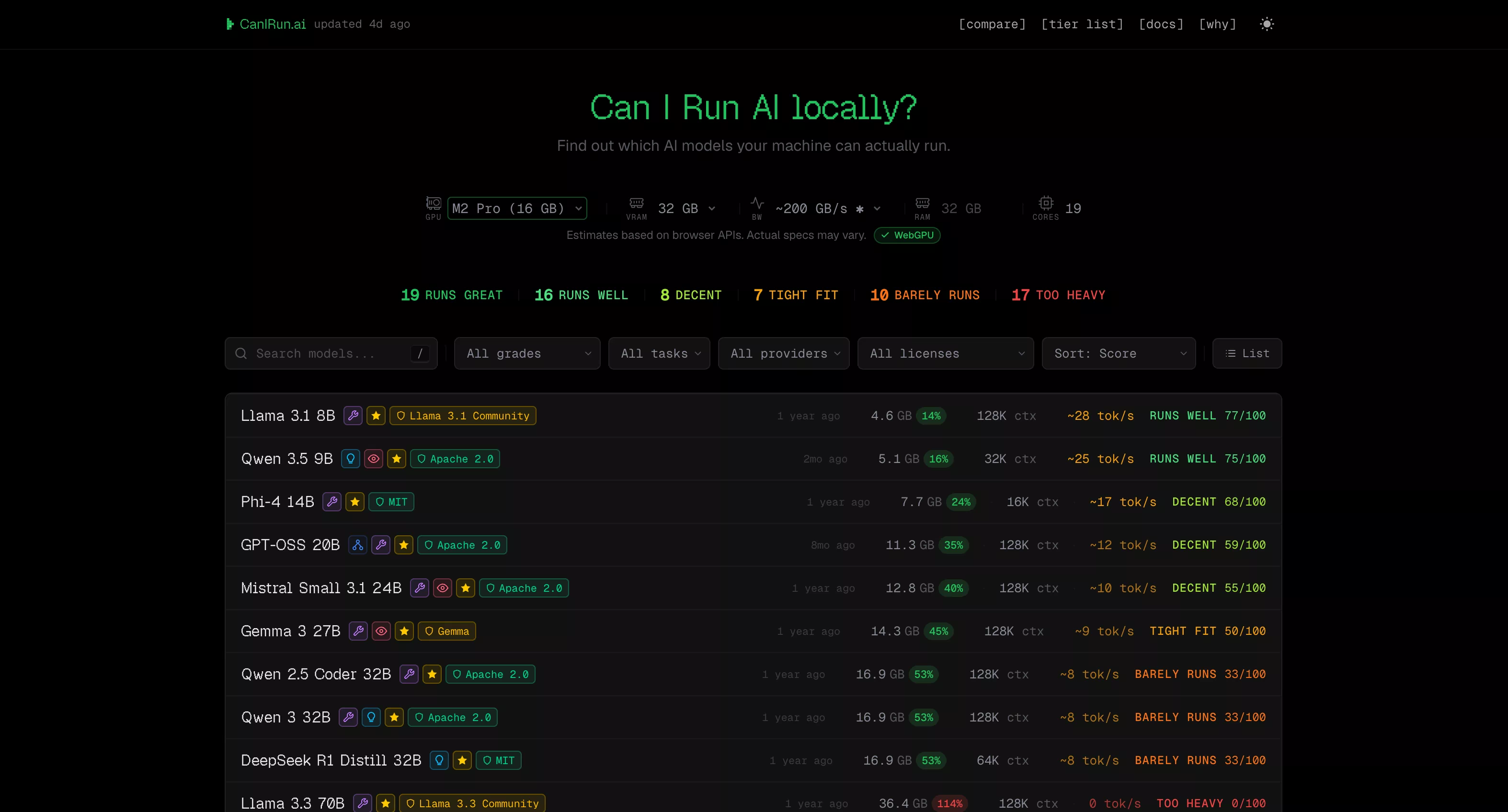
The recommended tool today, CanIRun.ai (https://www.canirun.ai/), was born precisely to solve this pain point. Open the website, run a one-click test, get results instantly—it clearly shows which models your hardware can run, how fast, and which quantization scheme is most suitable.
Core Features: Four Modules, Comprehensive Coverage
The core experience of CanIRun.ai revolves around four functional modules, each precisely targeting practical needs in local AI deployment.
1. Homepage Model Detection – "What can I run?"
Opening the website homepage, your browser automatically detects GPU, VRAM, RAM, and CPU core count, then instantly provides a model compatibility report. Each model is labeled with one of six grades:
| Grade | Meaning | Description |
|---|---|---|
| S - Runs great | Perfect Run | Fast inference, ample VRAM headroom |
| A - Runs well | Runs Well | Comfortable speed, reasonable VRAM usage |
| B - Decent | Decent | Usable but average experience |
| C - Tight fit | Tight Fit | Slow speed, limited context window |
| D - Barely runs | Barely Runs | Extremely slow output |
| F - Too heavy | Won't Run | VRAM insufficient |
The site's database covers 70+ mainstream open-source models from the 0.6B Qwen 3 0.6B to the 1T parameter Kimi K2, spanning 20+ vendors including Meta (Llama series), Alibaba (Qwen series), Google (Gemma series), DeepSeek, Microsoft (Phi series), Mistral AI, OpenAI (GPT-OSS), NVIDIA (Nemotron), and more.
Powerful filtering features: You can filter multi-dimensionally by run grade (e.g., only S/A/B), task type (Chat / Code / Reasoning / Vision), license type (Apache 2.0, MIT, commercially usable, etc.), architecture type (Dense / MoE), and sort by rating, parameter count, context length, inference speed, etc.
Each model card also shows VRAM requirements for 7 quantization levels (Q2_K → F16), allowing you to precisely choose the version best suited for your hardware.
2. Tier List Ranking – "The Classic Tier View"
The /tier page arranges all models into the classic S/A/B/C/D/F grading table based on your hardware's performance, visually showing "which offer a god-tier experience, which are barely usable, and which are completely out of the question." It supports hiding F grades, viewing only popular models, downloading as an image, or copying to clipboard for sharing—perfect for tweets or forum discussions.
3. Compare Device Comparison – "AMD or NVIDIA? Mac or PC?"
The /compare page allows you to select two devices for model-by-model comparison, with the system automatically highlighting the winner. For example, you can directly compare RTX 4090 vs M4 Max, or RTX 4060 vs RX 7900 XTX, seeing at a glance the run rating and inference speed difference for each model on both devices.
This is especially valuable for hardware purchasing decisions—before buying a new GPU or Mac, check CanIRun.ai to compare and see how many models your target device can run and the expected experience, which is far more informative than just looking at specs.
4. Docs Documentation – "Beginner-Friendly, Clear Concepts"
The /docs page explains core concepts of local AI with concise visual charts:
- Parameters: 1-3B fast but weak, 70B+ strong but hardware-hungry, 13-34B is the sweet spot.
- Quantization: Q4_K_M is the king of cost-performance (size reduced to 30%, quality retained at 88%), Q8_0 is nearly lossless, F16 is full precision.
- VRAM: The model must fully fit into VRAM for smooth operation; if not, it falls back to CPU inference, causing a drastic speed drop.
- MoE (Mixture of Experts): Models like Mixtral 8x7B have 46.7B total parameters but only activate 12.9B per inference, balancing quality and speed, but the total parameters still need to fit into VRAM.
- Context Length: 128K context ≈ 100k words, but longer lengths consume more memory.
- Tokens/s (Inference Speed): 60+ tok/s feels instant, 30-60 is fast and comfortable, <5 is agonizing.
- GGUF Format: The quantized model file format common to llama.cpp / Ollama / LM Studio.
- Memory Bandwidth: The real bottleneck for inference—RTX 4090 bandwidth is 1008 GB/s, RTX 4060 is only 272 GB/s, which is why the 4090 is much faster with the same VRAM usage.
Technical Principles: Everything Done in the Browser, Zero Privacy Risk
The most impressive aspect of CanIRun.ai is: All detection and calculations are performed locally in your browser; no data is sent to any server.
Hardware Detection Trio
- WebGL: Creates a hidden WebGL canvas, uses the
WEBGL_debug_renderer_infoextension to obtain GPU model and vendor information. - WebGPU: If the browser supports it, requests an adapter to get additional device and architecture details.
- Navigator API: Uses
navigator.hardwareConcurrencyto get CPU core count,navigator.deviceMemoryfor approximate RAM capacity, and runs a ~30ms CPU micro-benchmark to estimate single-core performance.
GPU Database
After detecting the GPU, it looks up a match in the built-in database of ~40 NVIDIA/AMD/Intel desktop GPUs and ~12 Apple Silicon chips to obtain the two key parameters: VRAM capacity and memory bandwidth.
Rating Algorithm
The composite score (0-100) is based on three major factors:
- Speed Score (55% weight): Estimates tok/s based on GPU memory bandwidth and model VRAM usage. 80+ tok/s gets 100 points, <5 tok/s gets only 10 points.
- VRAM Headroom (35% weight): The less VRAM a model uses, the more headroom available, the higher the score.
- Quality Bonus (~10%): Larger parameter models receive a small bonus (capped at 15 points), reflecting the common sense that "larger models are smarter."
Specifically, if a model can only "tightly fit" into VRAM, the total score is multiplied by a 0.65 penalty coefficient, warning you that the actual experience may be far worse than the score suggests.
Apple Silicon Special Handling
Apple Silicon Macs use a unified memory architecture where CPU and GPU share memory. CanIRun.ai sets the available memory limit to 75% of total RAM (multiplied by a 70% safety factor). This means a 36GB MacBook Pro has about 27GB available to run models—far exceeding the capability of a typical 8GB graphics card.
Model Library: Cutting-Edge, Continuously Updated
CanIRun.ai's model library is updated very promptly. As of writing, it includes the following latest models:
- Gemma 4 series (E2B / E4B / 26B-A4B / 31B, released April 2026, updated 5 days ago)
- GPT-OSS 20B / 120B (OpenAI's first open-weight model, Apache 2.0 license)
- DeepSeek V3.2 (685B parameters, one of the current strongest MoEs)
- Qwen 3.5 series (0.8B to 397B-A17B, natively multimodal)
- Kimi K2 (1T parameters, giant MoE with 384 experts)
- Devstral 2 123B (Mistral's model designed for code, SWE-bench 72.2%)
- Llama 4 Scout / Maverick (Meta's latest MoE architecture)
Data sources include the HuggingFace API (downloads, likes), Ollama Library (pull counts and available variants), and official model papers/announcements, automatically pulled during each build.
Who Is It For? Usage Scenarios
| User Type | Typical Scenario |
|---|---|
| AI Beginners | "I just bought an RTX 4060, what models can it run?" – Open and know instantly. |
| Hardware Shoppers | "Is upgrading from a 4060 to a 4070 for $200 more worth the experience difference?" – Use Compare. |
| Mac Users | "Can an M4 Pro 24GB run DeepSeek R1?" – Instant detection. |
| Model Developers | "How much VRAM does my new model need after Q4 quantization?" – Check quantization levels. |
| Tech Content Creators | "Need an intuitive comparison chart for a GPU roundup." – Export Tier List. |
Strengths and Limitations
👍 Praiseworthy:
- Zero Barrier: No registration, installation, or downloads needed; just open the browser.
- Privacy & Security: All calculations are local; hardware info is not uploaded.
- Broad Model Coverage: 70+ models, 7 quantization levels, continuously updated.
- High Educational Value: The Docs page is an excellent primer for local AI.
- Free & Open Source: Built by midudev for the local AI community, completely free.
- Well-Designed: Dark/light theme toggle, mobile-optimized, smooth interactions.
⚠️ Points to Note:
- Results are Estimates: Browser APIs provide limited hardware info; GPU names may be vague, RAM values approximate. Actual performance is affected by thermal throttling, background processes, driver versions, etc., with potential errors of ±20%.
- Limited GPU Database: ~40 desktop GPUs + 12 Apple Silicon chips. Some older or niche GPUs may not be recognized.
- No Multi-GPU Support: Currently only detects single-GPU scenarios.
- Linux Users May Not Detect GPU: Some Linux browsers have limited WebGL/WebGPU support.
Summary and Outlook
CanIRun.ai answers the most frequently asked question in local AI in the simplest way. It saves you from sifting through lengthy model documentation, manually calculating VRAM requirements, or waiting for replies on Reddit or forums—open the webpage, and the answer is right there.
With the explosive growth of open-source large models and the increasing maturity of local deployment tools (Ollama, LM Studio, llama.cpp), "hardware-model matchers" like CanIRun.ai will evolve from nice-to-have to essential tools. Its value will further increase if future features like multi-GPU support, custom hardware configuration, and model performance benchmarking are added.
Whether you're a newcomer to local AI or an experienced deployment veteran, CanIRun.ai deserves a spot in your bookmarks.
